Writing a DNS Server in Rust
|
Warning
|
This blog post is a work in progress. It is by no means finished. |
The full code for this project can be found at enidisepic/rust-dns.
Writing a DNS Server in Rust
A topic that has always intrigued me is network programming. I have attempted understanding it multiple times. Until one day, it just made sense. I couldn’t tell you how or why. My assumption is that the last three years of working as a programmer full-time have taught me more than I expected.
In this blog post I will go over how I implemented my RFC 1035 -compliant DNS server in Rust.
A decent knowledge of Rust is expected as I will not explain many details about Rust-specific features. I will, however, explain the DNS specification(s) to the extent necessary for this project as well as my logic for core logic such as reading and writing messages.
What will not be covered?
Why Rust?
I could go into detail about how Rust is a super cool and safe language but that doesn’t exactly matter for the purpose of this blog post. The real reason for me is simply that I’ve been meaning to learn Rust for a long time and I’m at a point in my programming journey that I feel confident in my ability to approach such a project in a language mostly unfamiliar to me.
Why a DNS server? Why not a web server?
The answer is that I would actually run a DNS server I have written myself in my homelab. I wouldn’t use a web server I have written because I do not trust my ability to make it as secure as the smart people who have created well-established web servers like nginx.
This isn’t to say I will never write my own web server. I probably will and I probably will write another blog post about it. But for now I feel a DNS server is simply cooler.
DNS Resolution Explained
The domain name system (DNS for short) is like the phone book of the internet. There are different types of DNS records
but the most common ones in day-to-day life are A and AAAA. These are records mapping domain names to IPv4 and IPv6
addresses respectively. Other record types include NS (name server), CNAME (canonical name - a mapping of an alias
to a canonical name like one with an A record), TXT (text) and many more.
There are three primary types of DNS resolvers:
-
authoritative resolvers (also called authoritative name servers)
-
forwarding resolvers
-
recursive resolvers
Authoritative Name Servers
These are probably the easiest type to explain. The authoritative name servers are the ones that hold authority over the
queried domain name. For example, the authoritative name servers for google.com are ns1.google.com through
ns4.google.com. If you ask them for a record regarding google.com and its subdomains, they have authority and will
give you an answer without first asking other DNS servers.
$ dig google.com @ns1.google.com

; <<>> DiG 9.18.30-0ubuntu0.24.04.2-Ubuntu <<>> google.com @ns1.google.com
;; global options: +cmd
;; Got answer:
;; ->>HEADER<<- opcode: QUERY, status: NOERROR, id: 34282
;; flags: qr aa rd; QUERY: 1, ANSWER: 1, AUTHORITY: 0, ADDITIONAL: 1
;; WARNING: recursion requested but not available

;; OPT PSEUDOSECTION:
; EDNS: version: 0, flags:; udp: 512
;; QUESTION SECTION:
;google.com.                    IN      A

;; ANSWER SECTION:
google.com.             300     IN      A       142.250.185.78

;; Query time: 24 msec
;; SERVER: 216.239.32.10#53(ns1.google.com) (UDP)
;; WHEN: Thu Aug 07 11:34:08 CEST 2025
;; MSG SIZE  rcvd: 5
Note the flags: aa, we will come to this later but AA being true means that the response comes from the
authoritative name server for the queried domain.
If we query a different DNS server which does not have authority over google.com, this flag will not be present:
$ dig google.com @1.1.1.1

; <<>> DiG 9.18.30-0ubuntu0.24.04.2-Ubuntu <<>> google.com @1.1.1.1
;; global options: +cmd
;; Got answer:
;; ->>HEADER<<- opcode: QUERY, status: NOERROR, id: 28416
;; flags: qr rd ra; QUERY: 1, ANSWER: 1, AUTHORITY: 0, ADDITIONAL: 1

;; OPT PSEUDOSECTION:
; EDNS: version: 0, flags:; udp: 1232
;; QUESTION SECTION:
;google.com.                    IN      A

;; ANSWER SECTION:
google.com.             134     IN      A       142.251.36.174

;; Query time: 21 msec
;; SERVER: 1.1.1.1#53(1.1.1.1) (UDP)
;; WHEN: Thu Aug 07 11:36:06 CEST 2025
;; MSG SIZE  rcvd: 5
Forwarding Resolvers
A forwarding resolver forwards the request to a different DNS server (commonly called an upstream server) if it doesn’t
have authority over the requested domain name. An example of this would be the DNS server I currently run in my homelab.
If I request the domain name of my homelab’s services the AA flag is set. If I, however, request a domain name I don’t
have set up in that DNS server, like google.com, it isn’t.
Recursive Resolvers
These are the most complicated type to explain but I’ll try my best. Recursive resolvers query different parts of the DNS hierarchy until they get to the name servers for the requested domain and can get a final answer from there.
The best way to explain this in my opinion is by just showing what happens and explaining along the way.
For this example we will be using google.com, again.
|
Note
|
In the real world, DNS servers typically use round robin in order to distribute load across different name
servers. So in one request we would ask a.root-servers.net, in the next b.root-servers.net, etc. We would also skip
a server if we don’t get a reply from it. When to check whether the server is available again in the case of an outage
is up to the implementation.
|
-
Ask root name servers (these are defined at Root Hints Zone) for the Top-level-domain (TLD) name servers of the
.comTLD. We have to ask forcom.which means we are asking for the name server of the fully qualified domain namecom(aka the TLD name servers for.comdomain).As you will see, the response also includes the
AandAAAArecords for the name servers of the.comsubdomain.$ dig com. NS @198.41.0.4 ; <<>> DiG 9.18.30-0ubuntu0.24.04.2-Ubuntu <<>> com. @198.41.0.4 ;; global options: +cmd ;; Got answer: ;; ->>HEADER<<- opcode: QUERY, status: NOERROR, id: 30064 ;; flags: qr rd; QUERY: 1, ANSWER: 0, AUTHORITY: 13, ADDITIONAL: 27 ;; WARNING: recursion requested but not available ;; OPT PSEUDOSECTION: ; EDNS: version: 0, flags:; udp: 4096 ;; QUESTION SECTION: ;com. IN NS ;; AUTHORITY SECTION: com. 172800 IN NS l.gtld-servers.net. com. 172800 IN NS j.gtld-servers.net. com. 172800 IN NS h.gtld-servers.net. com. 172800 IN NS d.gtld-servers.net. com. 172800 IN NS b.gtld-servers.net. com. 172800 IN NS f.gtld-servers.net. com. 172800 IN NS k.gtld-servers.net. com. 172800 IN NS m.gtld-servers.net. com. 172800 IN NS i.gtld-servers.net. com. 172800 IN NS g.gtld-servers.net. com. 172800 IN NS a.gtld-servers.net. com. 172800 IN NS c.gtld-servers.net. com. 172800 IN NS e.gtld-servers.net. ;; ADDITIONAL SECTION: l.gtld-servers.net. 172800 IN A 192.41.162.30 l.gtld-servers.net. 172800 IN AAAA 2001:500:d937::30 j.gtld-servers.net. 172800 IN A 192.48.79.30 j.gtld-servers.net. 172800 IN AAAA 2001:502:7094::30 h.gtld-servers.net. 172800 IN A 192.54.112.30 h.gtld-servers.net. 172800 IN AAAA 2001:502:8cc::30 d.gtld-servers.net. 172800 IN A 192.31.80.30 d.gtld-servers.net. 172800 IN AAAA 2001:500:856e::30 b.gtld-servers.net. 172800 IN A 192.33.14.30 b.gtld-servers.net. 172800 IN AAAA 2001:503:231d::2:30 f.gtld-servers.net. 172800 IN A 192.35.51.30 f.gtld-servers.net. 172800 IN AAAA 2001:503:d414::30 k.gtld-servers.net. 172800 IN A 192.52.178.30 k.gtld-servers.net. 172800 IN AAAA 2001:503:d2d::30 m.gtld-servers.net. 172800 IN A 192.55.83.30 m.gtld-servers.net. 172800 IN AAAA 2001:501:b1f9::30 i.gtld-servers.net. 172800 IN A 192.43.172.30 i.gtld-servers.net. 172800 IN AAAA 2001:503:39c1::30 g.gtld-servers.net. 172800 IN A 192.42.93.30 g.gtld-servers.net. 172800 IN AAAA 2001:503:eea3::30 a.gtld-servers.net. 172800 IN A 192.5.6.30 a.gtld-servers.net. 172800 IN AAAA 2001:503:a83e::2:30 c.gtld-servers.net. 172800 IN A 192.26.92.30 c.gtld-servers.net. 172800 IN AAAA 2001:503:83eb::30 e.gtld-servers.net. 172800 IN A 192.12.94.30 e.gtld-servers.net. 172800 IN AAAA 2001:502:1ca1::30 ;; Query time: 16 msec ;; SERVER: 198.41.0.4#53(198.41.0.4) (UDP) ;; WHEN: Thu Aug 07 11:51:46 CEST 2025 ;; MSG SIZE rcvd: 828NoteI have requested the name servers via the current IP address of a.root-servers.netrather than the domain name ofa.root-servers.net. I have done so since with a recursive resolver we can not assume the availability of a DNS server aside from ours. In the final project we will get this file and turn it into a format we can use on build. This file very rarely changes and if it does, it will not affect all root name servers (except for a catastrophic event probably causing a worldwide internet outage), so this is an alright thing to do. -
Next we have to ask those name servers for the actual domain’s name servers.
$ dig google.com NS @192.5.6.30 ; <<>> DiG 9.18.30-0ubuntu0.24.04.2-Ubuntu <<>> google.com @192.5.6.30 ;; global options: +cmd ;; Got answer: ;; ->>HEADER<<- opcode: QUERY, status: NOERROR, id: 31997 ;; flags: qr rd; QUERY: 1, ANSWER: 0, AUTHORITY: 4, ADDITIONAL: 9 ;; WARNING: recursion requested but not available ;; OPT PSEUDOSECTION: ; EDNS: version: 0, flags:; udp: 4096 ;; QUESTION SECTION: ;google.com. IN NS ;; AUTHORITY SECTION: google.com. 172800 IN NS ns2.google.com. google.com. 172800 IN NS ns1.google.com. google.com. 172800 IN NS ns3.google.com. google.com. 172800 IN NS ns4.google.com. ;; ADDITIONAL SECTION: ns2.google.com. 172800 IN AAAA 2001:4860:4802:34::a ns2.google.com. 172800 IN A 216.239.34.10 ns1.google.com. 172800 IN AAAA 2001:4860:4802:32::a ns1.google.com. 172800 IN A 216.239.32.10 ns3.google.com. 172800 IN AAAA 2001:4860:4802:36::a ns3.google.com. 172800 IN A 216.239.36.10 ns4.google.com. 172800 IN AAAA 2001:4860:4802:38::a ns4.google.com. 172800 IN A 216.239.38.10 ;; Query time: 29 msec ;; SERVER: 192.5.6.30#53(192.5.6.30) (UDP) ;; WHEN: Thu Aug 07 12:01:55 CEST 2025 ;; MSG SIZE rcvd: 287 -
Last but not least, we can ask those name servers for the A record of
google.com.$ dig google.com A 216.239.32.10 ; <<>> DiG 9.18.30-0ubuntu0.24.04.2-Ubuntu <<>> google.com A @216.239.32.10 ;; global options: +cmd ;; Got answer: ;; ->>HEADER<<- opcode: QUERY, status: NOERROR, id: 40587 ;; flags: qr aa rd; QUERY: 1, ANSWER: 1, AUTHORITY: 0, ADDITIONAL: 1 ;; WARNING: recursion requested but not available ;; OPT PSEUDOSECTION: ; EDNS: version: 0, flags:; udp: 512 ;; QUESTION SECTION: ;google.com. IN A ;; ANSWER SECTION: google.com. 300 IN A 142.250.185.78 ;; Query time: 29 msec ;; SERVER: 216.239.32.10#53(216.239.32.10) (UDP) ;; WHEN: Thu Aug 07 12:04:44 CEST 2025 ;; MSG SIZE rcvd: 55
Mini Primer on Ports and Protocols
DNS servers typically listen on port 53 via both UDP and TCP. Most queries will use UDP but critical and large queries will use TCP.
For the purpose of implementing our own DNS server this difference doesn’t matter much. In the end, we will process both the same as the underlying structure of requests and responses doesn’t change.
Listening to UDP requests
First things first. We need to start a UDP socket server and listen to requests. Luckily the Rust standard library has functionality for this
use std::net::UdpSocket;

const BIND_PORT: u16 = 2000;
const BIND_IP_ADDRESS: &str = "0.0.0.0";

fn main() -> std::io::Result<()> {
    let bind_address = format!("{BIND_IP_ADDRESS}:{BIND_PORT}");

    loop {
        let udp_socket = UdpSocket::bind(&bind_address)?;
    }
}
Simple enough for now! We have an infinite loop that constantly tries to bind to port 2000 on all available interfaces
(0.0.0.0). If we get data via UDP on one of these interfaces, it will bind and we can process it. If we don’t, it
will keep trying until we do.
|
Note
|
While DNS does usually run on port 53, that port is often taken by your operating system’s resolver which is why we will use port 2000 going forward. |
Cleaning Up the Code and Optimizing for Later Additions
While the above code would work if we just want to listen to requests via UDP and don’t want to any optimizations it’s better if we start optimizing early so we don’t have to do major refactors later.
First of all, let’s install the crates we need for this:
$ cargo add tokio tracing tracing-subscriber -F tokio/fullNow, let’s add a TCP socket listener, split the UDP and TCP processing into functions, and add the tokio magic!
The code for this is significantly longer so it’ll be in a collapsible block.
Click to reveal the full code
use std::io;
use std::net::SocketAddr;
use tokio::net::{TcpListener, TcpStream, UdpSocket};
use tracing::{Level, error, info, span};

const BIND_PORT: u16 = 2000;
const BIND_IP_ADDRESS: &str = "0.0.0.0";

struct DnsDatagram {
    length: usize,
    data: [u8; 512], // RFC 1035 specifies a maximum UDP datagram size of 512 bytes
    remote_address: SocketAddr,
}

#[tracing::instrument(skip_all, fields(remote_address = message.remote_address.to_string()))]
async fn handle_udp(socket: &UdpSocket, message: DnsDatagram) -> io::Result<()> {
    Ok(())
}

#[tracing::instrument(skip(stream))]
async fn handle_tcp(stream: &mut TcpStream, remote_address: SocketAddr) -> io::Result<()> {
    Ok(())
}

#[tokio::main]
async fn main() -> io::Result<()> {
    tracing_subscriber::fmt::init();

    let span = span!(Level::INFO, "main");
    let _guard = span.enter();

    let bind_address = format!("{BIND_IP_ADDRESS}:{BIND_PORT}")
        .parse::<SocketAddr>()
        .unwrap();

    let udp_listener = tokio::spawn({
        let _span = span!(Level::INFO, "udp_listener").entered();

        let udp_socket = UdpSocket::bind(bind_address).await?;
        info!("Listening on {} (UDP)", bind_address);

        async move {
            loop {
                let mut data = [0u8; 512];
                let Ok((length, remote_address)) = udp_socket.recv_from(&mut data).await else {
                    continue;
                };
                let dns_udp_message = DnsDatagram { length, data, remote_address, };
                match handle_udp(&udp_socket, dns_udp_message).await {
                    Ok(_) => info!("Handled UDP request from {}", remote_address),
                    Err(error) => error!("Failed to handle UDP request: {}", error),
                }
            }
        }
    });

    let tcp_listener = tokio::spawn({
        let _span = span!(Level::INFO, "tcp_listener").entered();

        let tcp_socket = TcpListener::bind(bind_address).await?;
        info!("Listening on {} (TCP)", bind_address);

        async move {
            loop {
                let Ok((mut stream, remote_address)) = tcp_socket.accept().await else {
                    continue;
                };
                match handle_tcp(&mut stream, remote_address).await {
                    Ok(_) => info!("Handled TCP request from {}", remote_address),
                    Err(error) => error!("Failed to handle TCP request: {}", error),
                }
            }
        }
    });

    udp_listener.await?;
    tcp_listener.await?;

    Ok(())
}
Understanding and Implementing the DNS Message Type
Next, we need to understand and implement the DNS message type. This will be a longer section but builds a foundation we need.
The DNS Message
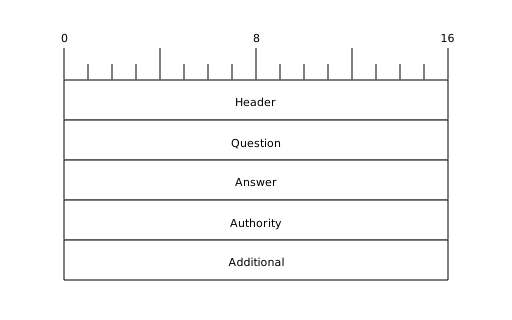
This should be easy enough to understand! What a header is should be pretty clear. It holds information required for us to parse the message properly.
The Question section is also fairly self-explanatory. It’s the question the server got asked. Usually this is one but
it can technically be multiple. However, I am not aware of any common DNS clients that would ever send multiple
questions in a single message.
The Answer, Authority and Additional sections are all so-called "resource records" (or `RR`s for short). This is
another type which is shared and the section they go in depends on the type of record (normal answer, pointing towards
an authority and additional).
In code a simplified representation might look something like this:
struct DnsHeader {}
struct DnsQuestion {}
struct Rr {}

struct DnsMessage {
    header: DnsHeader,
    question: DnsQuestion,
    data: Vec<Rr>,
}
The DNS Header
With that core understanding of what goes into a DNS message, we can start working our way down and represent the diagrams we find in the RFC in code.
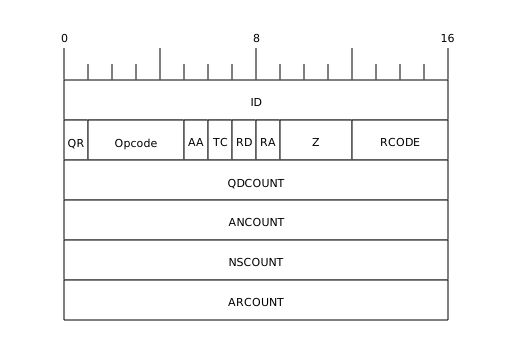
This might look a bit scary at first but don’t worry! I’ll do my best to explain it. And since I don’t just want to copy and paste the explanation from the RFC, I will implement this in code and show you with comments to make it easier to follow.
enum DnsQueryType {
    Standard, // Called QUERY by the RFC
    Inverse, // IQUERY
    Status, // STATUS
    Reserved // Reserved for future use
}

enum DnsResponseCode {
    Ok,
    FormatError,    // Couldn't interpret query
    // Couldn't process query due to name server problem (for example, forwarding server is down)
    ServerFailure,
    NameError,      // Only meaningful if we are authoritative. Name doesn't exist.
    NotImplemented,
    Refused,        // We don't want to answer your request
    Reserved
}

struct DnsHeader {
    id: u16,                        // ID; generated by the client, will be the same in the reply
    is_response: bool,              // QR; 0 = query, 1 = response
    query_type: DnsQueryType,       // Opcode
    is_authoritative: bool,         // AA; Only valid in response, are we authoritative
    // TC
    // Whether the response RRs are too big for the current communication channel
    // (only used in UDP). Tells the client to try again via TCP.
    is_truncated: bool,
    is_recursion_desired: bool,     // RD; Whether the client wants the query to be resolved recursively
    is_recursion_available: bool,   // RA; Whether the server can offer recursion
    // Z; Three bits. All zero (in RFC 1035). u8 because that's the smallest we got.
    z: u8,
    response_code: DnsResponseCode, // RCODE
    question_count: u16,            // QDCOUNT
    answer_count: u16,              // ANCOUNT
    authoritative_count: u16,       // NSCOUNT
    additional_count: u16,          // ARCOUNT
}
I think I did a pretty good job at making that understandable via just the code.
The Question Type
Now, for a small breather, we will quickly write structs for the Question type and RRs.
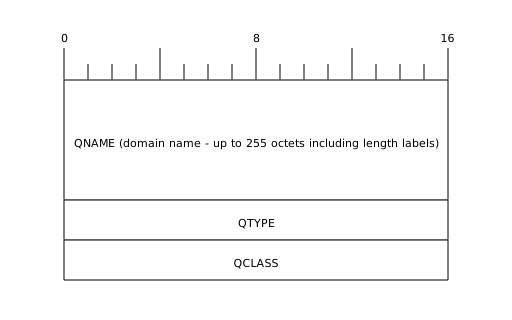
First the Question type. As above, diagram first, then code representation.
enum DnsType {
    // TYPEs
    A,              // IPv4 Address
    Ns,             // Authoritative Name Server
    Md,             // Obsolete - use MX
    Mf,             // ^
    Cname,          // Alias
    Soa,            // Start of a Zone of Authority
    Mb,             // Mailbox Domain Name - Experimental
    Mg,             // Mail Group Member - Experimental
    Mr,             // Mail Rename Domain Name - Experimental
    Null,           // Empty (NULL - duh)
    Wks,            // Well Known Service Description
    Ptr,            // Domain Name Pointer
    Hinfo,          // Host Information
    Minfo,          // Mailbox/Mail List Information
    Mx,             // Mail Exchange
    Txt,            // Text Strings

    // QTYPEs
    Axfr = 252,     // Zone Transfer Request
    Mailb = 253,    // Mailbox-related Records
    Maila = 254,    // Mail Agent RRs (obsolete - see MX)
    All = 255,      // All Records
}

// There are multiple class types but basically all cases we will be dealing with IN.
enum DnsClass {
    // CLASSes
    In,         // Internet
    Cs,         // CSNET (Obsolete - only used as an example in obsolete RFCs)
    Ch,         // CHAOS
    Hs,         // Hesiod (Dyer 87)

    // QCLASSes
    Any = 255,  // Any Class
}

struct DnsQuestion {
    labels: Vec<String>,
    question_type: DnsType,
    class: DnsClass
}
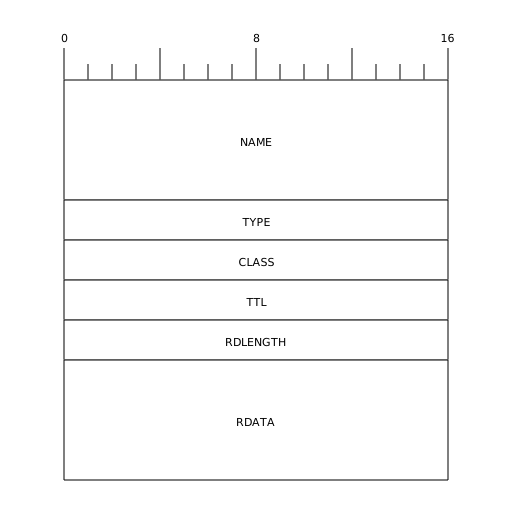
Now the generic RR type.
trait RDataEncode {
    fn encode(&self, writer: &mut impl Write) -> io::Result<()>;
}
trait RDataDecode {
    fn decode(reader: &mut impl Read) -> io::Result<Self> where Self: std::marker::Sized;
}

pub struct Rr<T> {
    name: String,
    rr_type: DnsType,
    class: DnsClass,
    ttl: Duration, // "Time To Live" - how long we can cache this at most
    data_length: u16,
    data: T,
}

impl<T: RDataEncode> RDataEncode for Rr<T> {
    fn encode(&self, writer: &mut impl Write) -> io::Result<()> {
        todo!()
    }
}

impl<T: RDataDecode> RDataDecode for Rr<T> {
    fn decode(reader: &mut impl Read) -> io::Result<Self> {
        todo!()
    }
}|
Note
|
I could have omitted the data_length field for the Rr struct but decided to keep it in to more directly
represent the format as per the RFC.
|
Now, since we added some things, we have to update our DnsMessage struct as well.
struct DnsMessage<T> {
    header: DnsHeader,
    question: DnsQuestion,
    data: Vec<Rr<T>>,
}

impl<T: RDataEncode> RDataEncode for DnsMessage<T> {
    fn encode(&self, writer: &mut impl Write) -> io::Result<()> {
        todo!()
    }
}

pub trait RDataDecode: Sized {
    fn decode(reader: &mut impl Read) -> io::Result<Self>;
}
Before we finish this journey and get to actually implementing some logic, I think it’s time to clean up our code and split it into some files. It is getting quite long after all.
The final code for this section can be found here.